
Partner Knowledge Base
Dynamic Pool alarm overview
| Note: The alarm only applies to FUSIONUltimate data plans. See Data plan types for more information. |
Dynamic Pool alarms help monitor usage and trigger alerts when a specific limit is reached across a pool of SIMs on FUSIONUltimate services. When the alarm is created, it is automatically associated with a dynamic pool of SIMs.
A dynamic pool is a group of SIMs associated with a specific Customer service. Each pool’s data allowance (same as Customer service tariff of SIMs) increases or decreases based on the number of SIMs in the pool. The alarm triggers when the combined usage of all SIMs in a pool reaches the specified limit.
For example, you might want to filter SIMs by Service and select one Customer services (e.g. H3G_50GB). If there are 3 SIMs on that service, the total data allowance of the pool becomes 150GB. If you add a SIM to the pool, the data allowance becomes 200GB. The limit you set remains the same regardless of how many SIMs are in the pool.
| Warning: If you select the Filter type Service and you select a service which does not apply to the alarm type you want to create (e.g. you select a FUSIONCore service in a Dynamic Pool alarm), the alarm will not trigger for SIMs on that service. |
Filtering SIMs by Service # #
When you set up your alarm, you can choose to filter by one or multiple Customer services which enables you to monitor different dynamic pools. If your alarm monitors multiple pools, you might want to consider using the % limit unit to ensure the alarm is triggered based on the relative usage of each pool of SIMs.
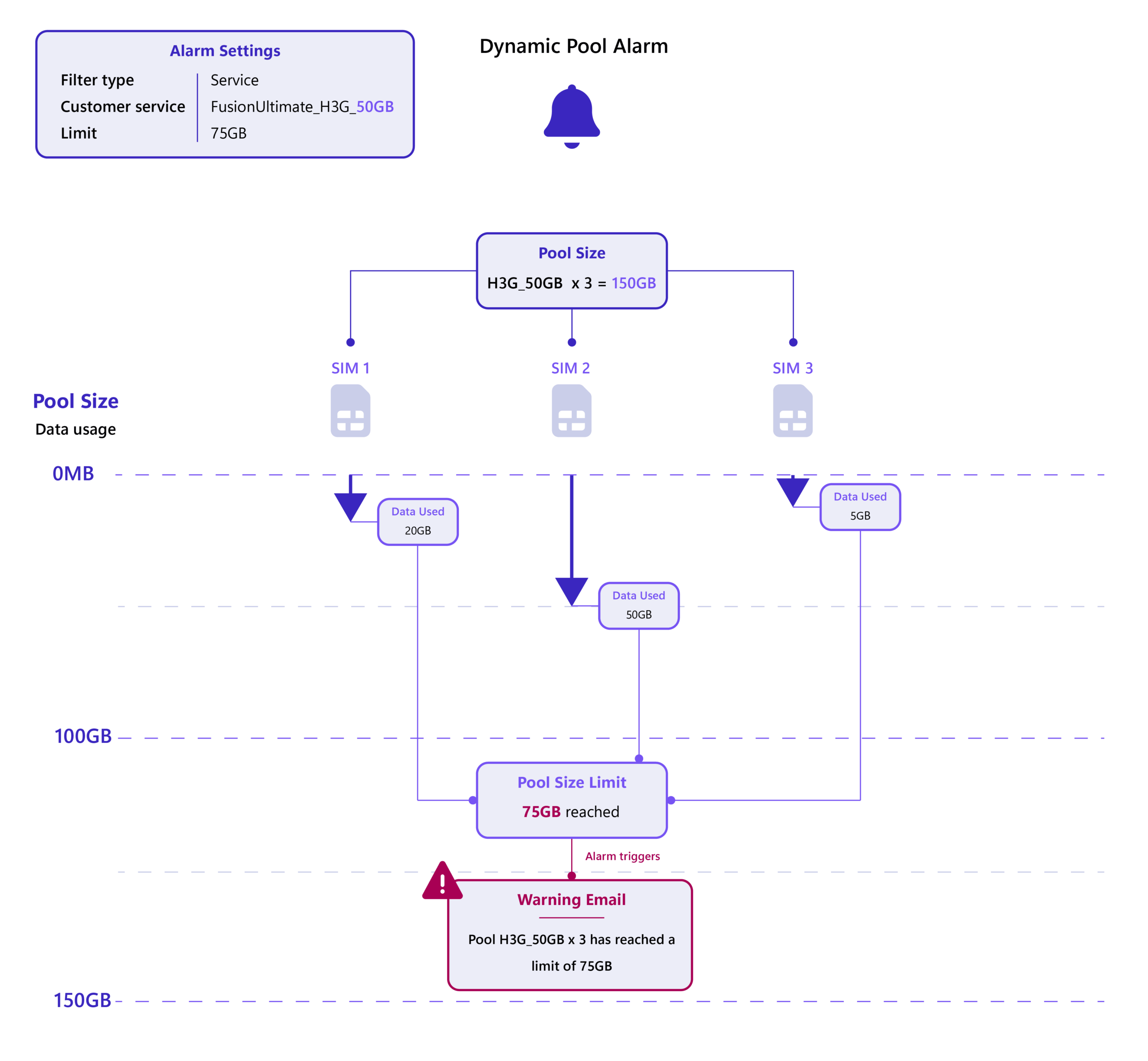
Filtering by one Customer service – Example #
- 3 SIMs on a 50GB tariff = 150GB pool
- Alarm limit set to 75GB → triggers when each of the pool’s usage limit hits 75GB
- If another 50GB SIM is added, the pool size increases to 200GB, and the limit remains at 75GB
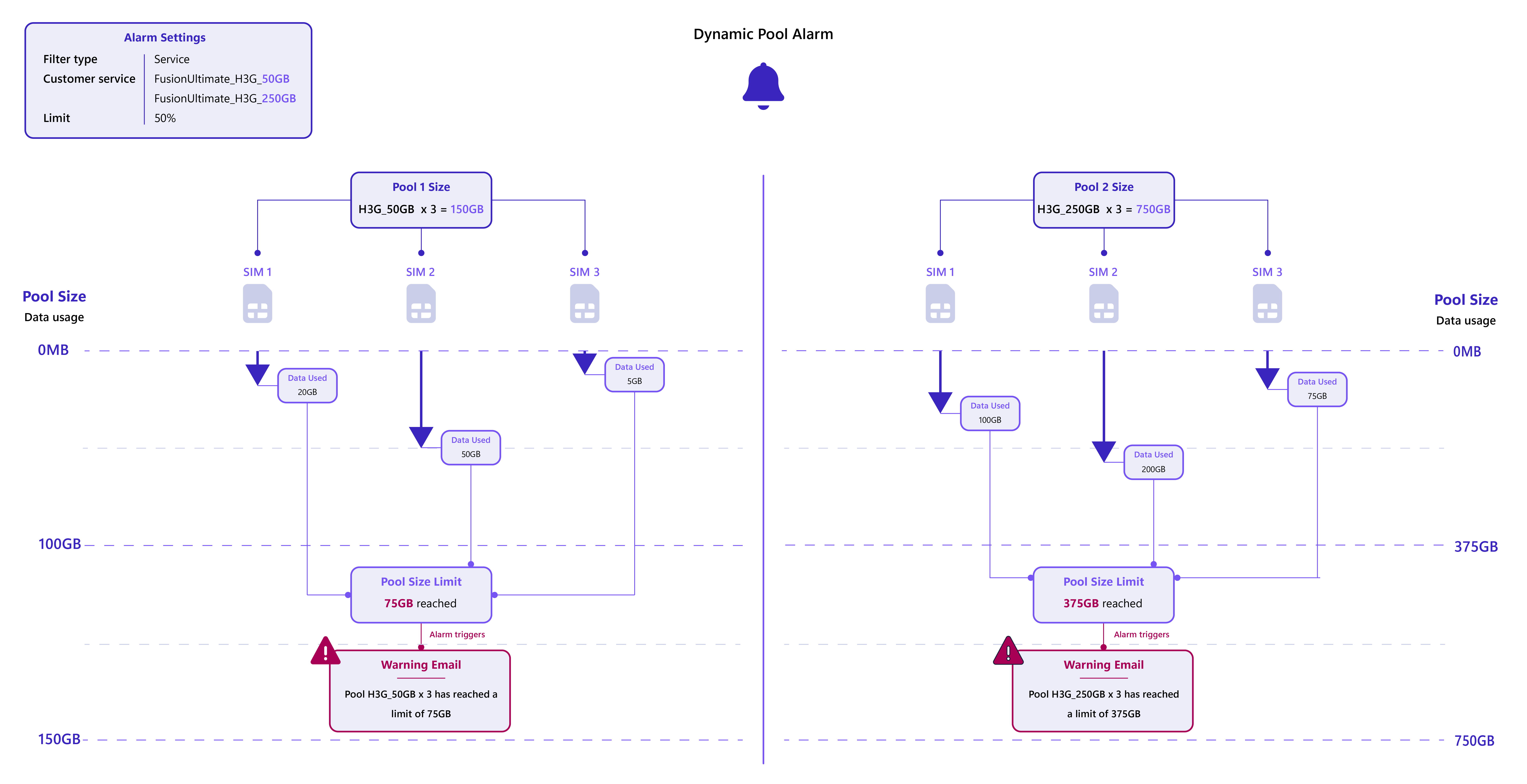
Filtering by multiple Customer services – Example #
- 3 SIMs on a 50GB tariff (Pool 1) = 150GB + 3 SIMs on a 250GB tariff (Pool 2) = 750GB
- Pool size limit = 50% → triggers when each of the pool’s combined usage hits 75GB (Pool 1) and 375GB (Pool 2)
| Note: See Filter types for more information on how filter types might change the way you set the limit of your alarm. |
SIM Pool Adjustments and Data Usage #
Data usage is calculated monthly, and dynamic pool alarms follow the same logic. SIMs are automatically added or removed from their respective pools based on service assignment.
How SIMs are added or removed #
- Added to a Pool: A SIM is automatically added when assigned a FUSIONUltimate service.
- Removed from a Pool: A SIM is removed when:
- Reassigned to a different service type (e.g., FUSIONBasic).
- Deactivated.
- Moved Between Pools: Reassigning a SIM from one FUSIONUltimate service to another (e.g., from FUSIONUltimate_H3G_50GB to FUSIONUltimate_H3G_250GB) removes it from the original pool and adds it to the new one.
Impact on pool size and usage limits #
Adding a SIM during the month #
Using the previous example Filtered by multiple Customer services, when a SIM with the Customer service H3G_50GB is added during the month:
- Pool size increases to 175GB: Only 50% of the new SIM’s allowance (25GB) is added.
- Usage limit adjusts to 87.5GB (50% of the new pool size).
- Next month: Full 50GB is added, making the pool 200GB, and the limit adjusts to 100GB.
Removing a SIM during the month #
Using the previous example Filtered by multiple Customer services, when a SIM with the H3G_50GB service is removed during the month:
- Pool size decreases to 125GB: Only 50% of the SIM’s allowance (25GB) is removed immediately.
- Usage limit adjusts to 62.5GB (50% of the new pool size).
- Next month: Full 50GB is removed, making the pool 100GB, and the limit adjusts to 50GB.
| Important: If your alarm uses a static unit (e.g. KB, MB, or GB), the limit remains unchanged regardless of the pool size changes. |