
Skip to content
FUSION IoT Partner Knowledge Base

Partner Knowledge Base

Release Notes
FUSION IoT Partner Knowledge Base
Release Notes

The FUSION IoT Portal

  • Getting Started
    • Partner portal overview
    • Logging in
    • Search and filters
  • The Internet of Things
    • What is IoT?
    • IoT Glossary
  • Manage your account
    • Password management
    • Your profile page
    • Configure Dashboards
    • Manage Dashboards
  • Troubleshooting
    • Troubleshooting login issues
    • Troubleshooting error messages

SIM Management

  • SIM Overview
  • Interactive SIM assignment guide
  • View SIM information
  • Filter SIMs
  • SIM Overview Terms
  • SIM ordering and assignment
    • SIM order and assignment overview
    • Ordering SIMs
    • Creating Customer Services
    • Migrating SIMs to another Partner Service
    • Assigning SIMs to Customers
    • Activating SIMs
  • Managing SIMs
    • Manage SIM status
    • Assign SIM to an IMEI status change Alarm
    • Manage SIM Info Fields
    • Export SIMs
    • Export SIM CDRs
    • SIM status tab

Services Management

  • Generic services Overview
  • View Service Info
  • Create a Service note
  • View Service SIMs
  • Remove a Service
  • Edit a Service

Partners

  • Partner Overview
  • View Partner Info
  • View Assigned tariffs
  • View Partner CDRs
  • View Partner EDRs
  • View Partner Notification History
  • View Partner Users
  • View Customers
  • View Partner Journal

Customer Management

  • Customer Overview
  • Add a new Customer
  • Creating Customer Services
  • Edit Customers
  • Adding Customer Tags
  • View Customer Info
  • View Customer CDRs
  • View Customer EDRs
  • View Customer SIMs
  • View Customer Users
  • View Customer Notification History
  • Export Customers
  • Delete Customers

Notifications

  • Notifications Overview
  • Notification history
  • View notification details
  • Export Notification history

Users & Roles

  • User Management
    • View Users
    • Create a Customer user
    • Create a Partner user
    • Activate Users
    • Manage Users
    • User Logs
    • User Journal
  • Roles
    • Roles Introduction
    • View Roles
    • Manage User Roles
    • Partner Roles Matrix

Journal

  • Journal Overview
  • Export Journal
  • Home
  • Home
  • Notifications
  • View notification details
View Categories

View notification details

What role/s can view this? Partner admin, Partner provisioning.

From notification history, you can to view more details about a specific notifications and trigger it to be resent if needed. Resending a notification is useful if a customer misses it or the notification fails to send.
View notification details #

  1. Navigate to Notification history
  2. Locate the relevant notification
  3. Click Detail in the Actions column

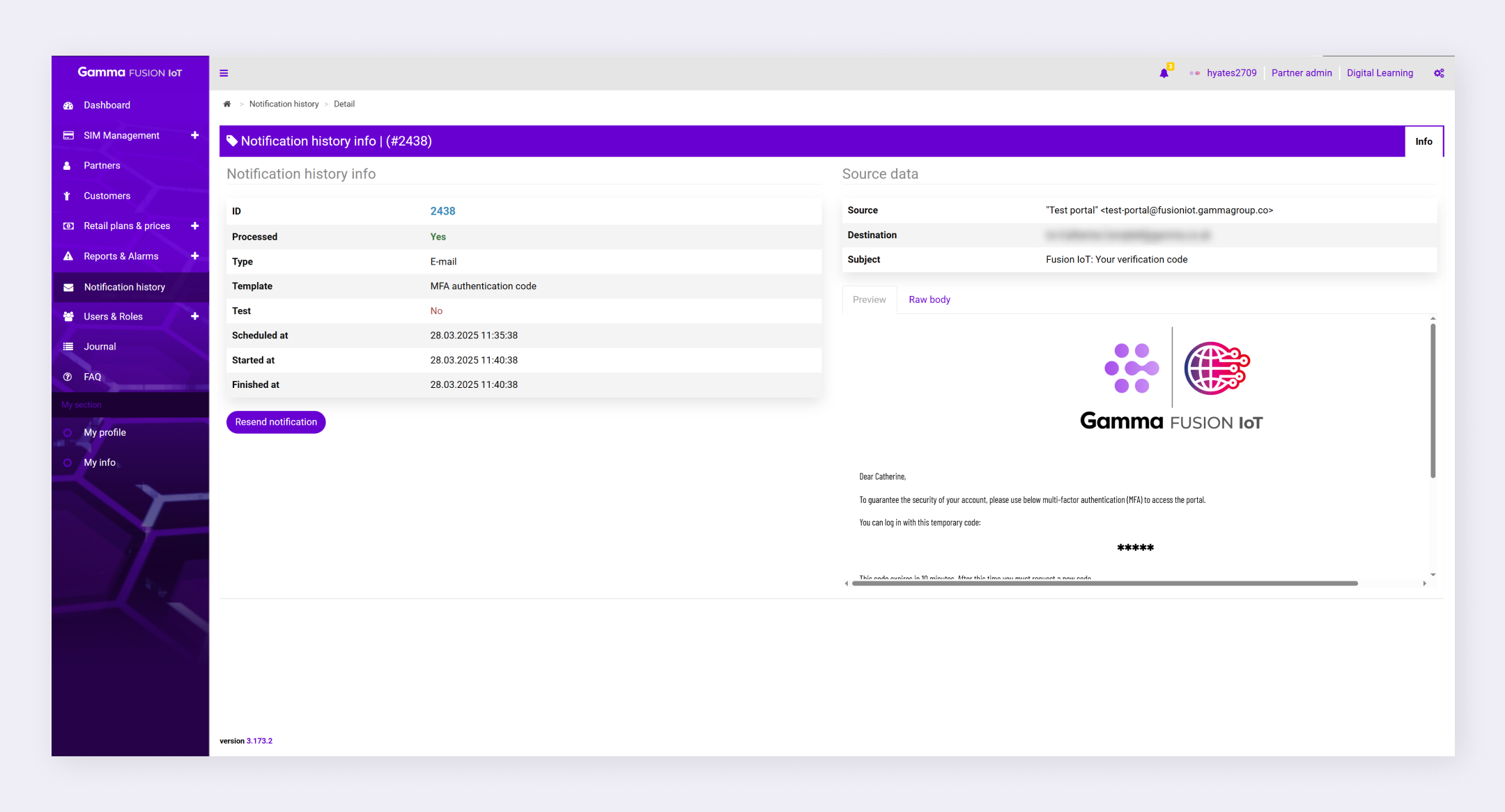
The portal displays the notification details.

Note: You can access notification history from a few areas of the portal. See Notification history.

Notification details #

When you view the details of a notification, you can view information about the notification as well as the source data:

  • Notification history info: The info section lists information such as the ID, the template used and when the notification was processed. This information is useful to ensure notifications are being delivered successfully.
  • Source data: The source data shows where the notification came from and it’s destination. You can also view the notification either as a preview or as the raw body.

Resend notification #

  1. Navigate to notifications details
  2. Click Resend notification
  3. Click Confirm

The notification is resent.

How did you find this training?
Notification historyExport Notification history
Table of Contents
  • View notification details
  • Notification details
  • Resend notification
We use cookies to measure performance and make improvements to this service. This includes page views, device/browser, location, and page interactions. We do not collect any information you upload to this site. By agreeing, you consent for your data to be used for this purpose.